Load shape library: Load shape upload and file validation
The Load Shape library is similar to the impact profile library.
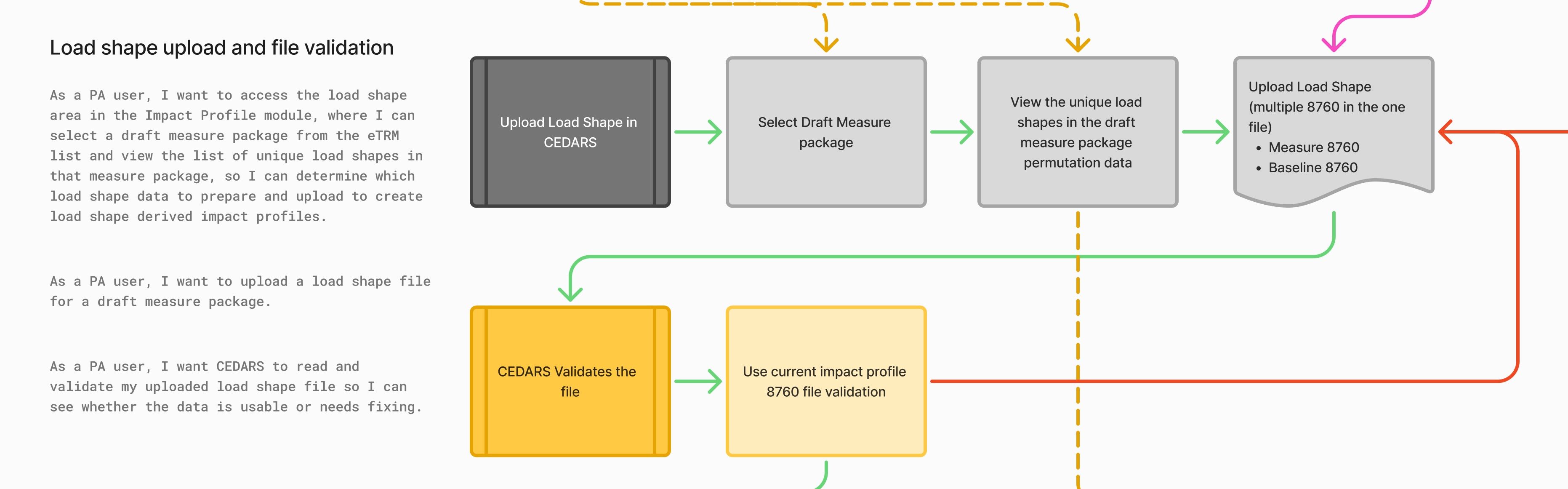
As a PA user, I want to access the load shape area in the Impact Profile module, where I can select a draft measure package from the eTRM list and view the list of unique load shapes in that measure package, so I can determine which load shape data to prepare and upload to create load shape derived impact profiles.
PA users have access to the load shape area within the Impact Profile library
When a PA user goes to add a load shape, they can view the draft measure package available to their PA
They can select a draft measure package, and CEDARS displays the measure packages' unique load shapes list
If no draft measure packages are available, a clear message explains what this means and what to do next
If the package details cannot be loaded, a clear error message is shown that does not assume prior setup or existing data
Display the date the list was last synced
As a PA user, I want to upload a load shape file for a draft measure package.
File upload succeeds
Upload is linked to the selected draft measure package
UI confirms upload success
As a PA user, I want CEDARS to read and validate my uploaded load shape file so I can immediately see whether the data is usable or needs fixing.
Files with multiple 8760 series are parsed successfully
Validation runs on each 8760 series
Invalid series are clearly identified
Multiple validation errors are returned and displayed together
- Select the module in CEDARS
- Select user type
This request was merged into another request
Comments1
cedars team
Mar 4
Load Shape Upload for CEDARS Template.xlsx
21.5 KB• Spreadsheet