Claims: Improve validation to indicate the location of empty columns
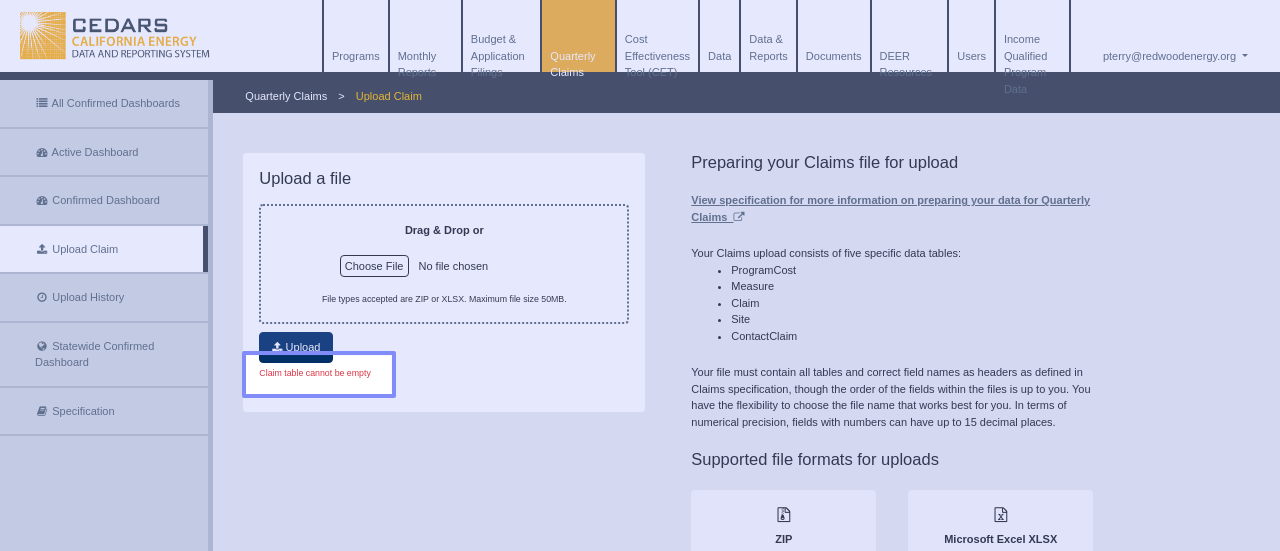
We are trying to upload our 2024YR Claims and when we try and upload the XLSX file now, we are getting an error that says “Claims table cannot be empty.” I even tried going to the Specifications page and downloading the Good Claims and uploading that. I got the same error.
- Select the module in CEDARS
- Select user type
Log in to comment and vote
Comments3
Apr 30, 2025
PinnedThe example file has been updated, but we plan to improve the error validation to indicate the location of empty columns (e.g., “Empty column detected between 'ComplianceCertDate' and 'Comments' in 'Claim' table”).
cedars team
Apr 9, 2025
I ran some tests on the example XLSX file provided in the Claims specifications and believe an additional empty column may be causing the problem. If you’d like to check for the same error, it's in the Claim table between “ComplianceCertDate” and “Comments.” Deleting this empty column might resolve the issue.
We will add to the ticket for development to improve guidance on upload validation regarding this matter and to update the example file.
cedars team
Apr 7, 2025
Hi @pterry@redwoodenergy.org could you please attach the file you were trying to upload so I can investigate this issue for you.