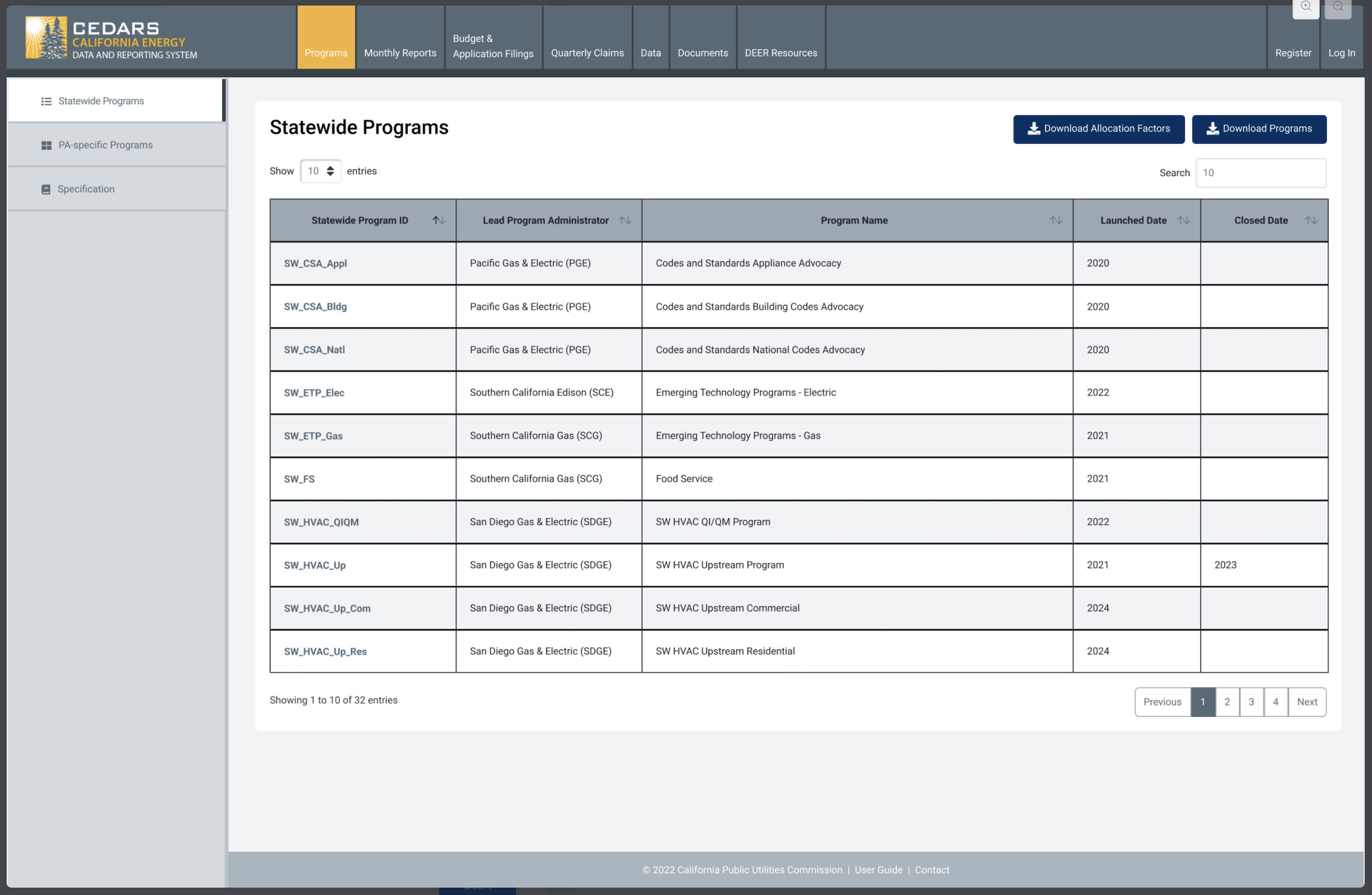
Allow users to download the statewide program allocation factors
Background
To date, Jenn has generated a statewide allocation factor spreadsheet upon request; this ticket is to make that same data available for download from CEDARS. Automate this process.
Requirements
New button on statewide program page that allows user to download the statewide allocation factors for all years as a .csv file.
For public
communityusers and up (i.e. everyone)
User story
As a public user, I want to download all statewide factors for all statewide programs for all years from the statewide program page so that I can use those factors in my internal systems.
Design
Design survey: Feedback closed.
Requirements & acceptance criteria
Any CEDARS user can download a .csv file on demand containing all statewide program allocation factors for all years.
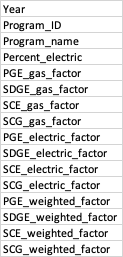
Data file fields
Testing
This can be tested by the development team and does not require UAT.
Test steps
Open the CEDARS website
Log out of CEDARS if logged in
Click on the program tab
Click on statewide programs in the left nav
Click the download allocation factors button in the upper right section of the page
Wait for file to download
Open the downloaded file to see allocation factors for statewide programs
Schedule
No scheduling requirement.
Development estimate
T-shirt size: small
- Select the module in CEDARS
- Select user type
Log in to comment and vote
Comments14
cedars team
Sep 12, 2024
I have a short survey of two design options for the PAs to complete: https://t.maze.co/281965022
[Deleted User]
Sep 12, 2024
submitted
cedars team
Sep 17, 2024
There is no real consensus on the design choice due to minimal engagement in the survey, so I think we should go with the light-touch choice. If deemed valuable or important, changes to the overall table design can come at a later date.
[Deleted User]
Oct 2, 2024
@cedars team SW allocation factors download in staging looks good to me. Thank you.
Jennifer Scheuerell
Sep 3, 2024
Requirements Meeting on 9/3/24
Feature is to be available to all users (public / not logged in)
Where should it go?
Statewide programs page
Maybe near the “Download Programs” button (deferred to designer)
File for download will be a .csv
Will be an independent download and button
i.e. it will not added to the existing “Download Programs” button
Will be a dynamic file - when data in CEDARS change the download file contents will also update
Data will include all IOUs and all years (file will still be small)
Background
These data have been provided via email on request in the past, often around budget filing submissions
These data are public in CEDARS currently so there are no data security / privacy concerns with the feature
Jennifer Scheuerell
Jul 6, 2024
No assigned task priority in Motive Power ranking.
sshkolnikov
Sep 4, 2024
Per the Requirements Gathering Session on 9/3/24.
Attendees: Roopa Reddy, Greg Green, Gary Golden, David Padilla, Alison Kulka, Stephanie Shkolnikov, Sonja Loader-Jurac and Jenn Scheuerell
Requirements: Enable Download of Statewide Program Allocation Factors
What are the main goals and objectives of this development request?
For users to self-serve and obtain the statewide program allocation factors data
To immediately have access to the data when desired.
What problem are we trying to solve with this development request?
Statewide Program Allocation Factors data must be requested from/provided by the development team on an ad hoc basis by users.
Users must specifically request this information through the development team. Users have communicated that this is an inconvenience and not an immediate solution or readily available.
What specific features or functionalities do you need?
Downloadable Statewide Program Allocation Factors report
This report is a .csv file
This report contains data for all IOU’s
This report is for all years
Download available for all users (unauthenticated, community, CPUC and PA’s)
File available for download will contain the most recent data available
Are there any security, compliance, or regulatory requirements?
Requirements gathering session confirmed there are no security requirements, compliance or regulatory requirements for this effort
This data is available and approved for all users to access
Are there any technical constraints or limitations we should be aware of?
No constraints or limitations were communicated by the development team during requirements gathering
Are there potential risks and how should we mitigate them?
No risks were identified by either the development team or stakeholders during requirements gathering session
How will we validate that the requirements are being met?
Development team will demo the functionality and take feedback from stakeholders
Stakeholders will test this functionality in the staging environment
Stakeholders will provide feedback per testing results
What criteria will be used to accept or reject user acceptance? Define how success will be measured.
All users will navigate to the Programs tab>Statewide Programs
When in the Statewide Programs screen, user will find the download button
User will click download button and be served a .csv file that contains the most updated data for all IOU’s and all years
sshkolnikov
Sep 4, 2024
User journey/flow.
Jennifer Scheuerell
Sep 26, 2024
This work is up on testing for anyone who would like a look.
Two questions:
Does having the SW_PrgID - SW_ProgramName together under the field name “StatewideProgram” in one field work well or would it be better to have each element as its own separate fields?
Do we want to keep in the file the summary provided by the lead PA last time they updated the factors for that program/year? For example:
jvrz@pge.com
Sep 30, 2024
We would want them separate (PrgID and ProgramName). We will use the PrgID with our IOU prefix to link to our programs when doing allocation work on our side.
I think keeping the summary is fine but I’m OK if we don’t have it too.
I wanted to note that the download had a file name inside of single quotes (‘), which isn’t normal. Probably something to fix.
jvrz@pge.com
Sep 30, 2024
Tagging @RoopaReddy_PGE
Roopa Reddy
Sep 30, 2024
Please include SW_PrgID and SW_ProgramName as separate fields in the download and keep the summary. Thanks.
Question:
Why does the SW factors download have quotes in the filename?
example: 'statewide_factors_20240930.csv'